关于IDisposable, 官方有很多很好的资料, 例如Framework Design Guidelines中的Dispose Pattern一节(https://docs.microsoft.com/en-us/dotnet/standard/design-guidelines/dispose-pattern), 还有VS2015 Code Analysis for Managed Code Warnings中给出的使用示例CA1063: Implement IDisposable correctly(https://msdn.microsoft.com/en-us/library/ms244737.aspx)等等
相关细节很多, 这里简要记录两点 1. IDisposable用来做什么. 2. IDisposable的一般用法
1.IDisposable用来做什么
IDisposable提供了一种释放非托管资源的机制(Provides a mechanism for releasing unmanaged resources). 这里重点是两个1: 释放资源 2. 非托管资源
资源有托管和非托管之分, 非托管的资源包括 a file, a database connection, a socket, a mutex, a bitmap, an icon 等等
托管的资源由garbage collection 自动回收, 非托管的资源则需要手动释放.非托管资源一般会用一个托管类包装(wrap), 例如类FileStream, SqlConnection, Socket, Mutex, Bitmap. 对于这些包含非托管资源的托管类, C#提供了IDisposable接口, 表明在该类实例结束使用时, 需要手动调用它的Dispose方法来释放非托管资源.
手动意味着遗忘, 这里要引出C#中的析构方法(destructor 或者fnalizer). 析构方法会在实例被回收之前调用. 由于托管资源(内存)会被garbage collection自动回收,
一般不需要在类中定义析构方法. 如果托管类中包含非托管资源, 为了防止没有被手动释放, 可以将Dispose方法放在析构方法中. 于是在设计Dispose方法实现的时候, 需要考虑到这两种情况: 1. 手动释放 2. 由析构方法释放. 3. 如果已经手动释放过了, 要避免再被析构方法释放.
官方有标准实现, 具体见下面.
2.IDisposable的一般用法
这里分为3点: a 怎样使用实现IDisposable接口的类, b. 怎样设计实现IDisposable的类 c. 要不要实现IDisposable接口
a.怎样使用实现IDisposable接口的类
IDisposable和using搭配使用(标准用法)
1 | using (FileStream fs = new FileStream ("myFile.txt", FileMode.Open)) |
b. 怎样实现IDisposable的Dispose方法
流程图(C#图解教程):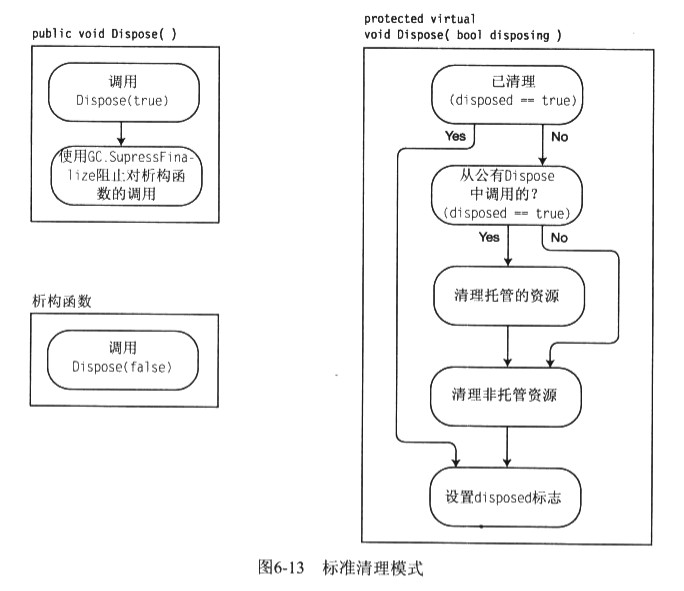
官方标准实现(注释最为详尽)1
2
3
4
5
6
7
8
9
10
11
12
13
14
15
16
17
18
19
20
21
22
23
24
25
26
27
28
29
30
31
32
33
34
35
36
37
38
39
40
41
42
43
44
45
46
47
48
49
50
51
52
53
54
55
56
57
58
59
60
61
62
63
64
65
66
67
68
69
70
71
72
73
74
75
76
77
78
79
80
81
82
83
84
85
86
87
88
89
90
91
92
93
94
95
96
97
98using System;
using System.ComponentModel;
// The following example demonstrates how to create
// a resource class that implements the IDisposable interface
// and the IDisposable.Dispose method.
public class DisposeExample
{
// A base class that implements IDisposable.
// By implementing IDisposable, you are announcing that
// instances of this type allocate scarce resources.
public class MyResource: IDisposable
{
// Pointer to an external unmanaged resource.
private IntPtr handle;
// Other managed resource this class uses.
private Component component = new Component();
// Track whether Dispose has been called.
private bool disposed = false;
// The class constructor.
public MyResource(IntPtr handle)
{
this.handle = handle;
}
// Implement IDisposable.
// Do not make this method virtual.
// A derived class should not be able to override this method.
public void Dispose()
{
Dispose(true);
// This object will be cleaned up by the Dispose method.
// Therefore, you should call GC.SupressFinalize to
// take this object off the finalization queue
// and prevent finalization code for this object
// from executing a second time.
GC.SuppressFinalize(this);
}
// Dispose(bool disposing) executes in two distinct scenarios.
// If disposing equals true, the method has been called directly
// or indirectly by a user's code. Managed and unmanaged resources
// can be disposed.
// If disposing equals false, the method has been called by the
// runtime from inside the finalizer and you should not reference
// other objects. Only unmanaged resources can be disposed.
protected virtual void Dispose(bool disposing)
{
// Check to see if Dispose has already been called.
if(!this.disposed)
{
// If disposing equals true, dispose all managed
// and unmanaged resources.
if(disposing)
{
// Dispose managed resources.
component.Dispose();
}
// Call the appropriate methods to clean up
// unmanaged resources here.
// If disposing is false,
// only the following code is executed.
CloseHandle(handle);
handle = IntPtr.Zero;
// Note disposing has been done.
disposed = true;
}
}
// Use interop to call the method necessary
// to clean up the unmanaged resource.
[]
private extern static Boolean CloseHandle(IntPtr handle);
// Use C# destructor syntax for finalization code.
// This destructor will run only if the Dispose method
// does not get called.
// It gives your base class the opportunity to finalize.
// Do not provide destructors in types derived from this class.
~MyResource()
{
// Do not re-create Dispose clean-up code here.
// Calling Dispose(false) is optimal in terms of
// readability and maintainability.
Dispose(false);
}
}
public static void Main()
{
// Insert code here to create
// and use the MyResource object.
}
}
另外可以再加一个字段:
public bool IsDisposed { get; private set; }
如果该类被Dispose后还被调用该类的其他方法, 则抛出异常
区别Close和Dispose, Close方法不一定等同于Dispose. 可以再定义一个Close方法
c.要不要实现IDisposable接口
1) 假如该类包含了Socket, Bitmap, FileStream等实现了IDisposable接口的类, 那么该类也需要实现IDisposable接口
2) 假如该类的子类有可能用到非托管资源, 那么该类也实现IDisposable接口. 例如Stream类. 需要注意的是, 它的其中一个子类MemoryStream没有用到非托管资源, 但也实现了Dispose方法. 这是网上讨论的IDisposable接口污染问题. 详见https://www.zhihu.com/question/51592470
另外: IDisposable最初是用来释放非托管资源的, 但现在也有其他的用法, 例如Reactive Extention中的用法 https://msdn.microsoft.com/en-us/library/dd782981(v=vs.110).aspx